
Sales Order Management Software: A Right-Sized Guide
Sales order management software is meant to take an order from "yes" to "shipped and paid" without anything falling through the cracks. But most growing businesses get sold a bloated generic platform when they need one right-sized system they actually own. Here is what to look for, and the leaner way to get it.
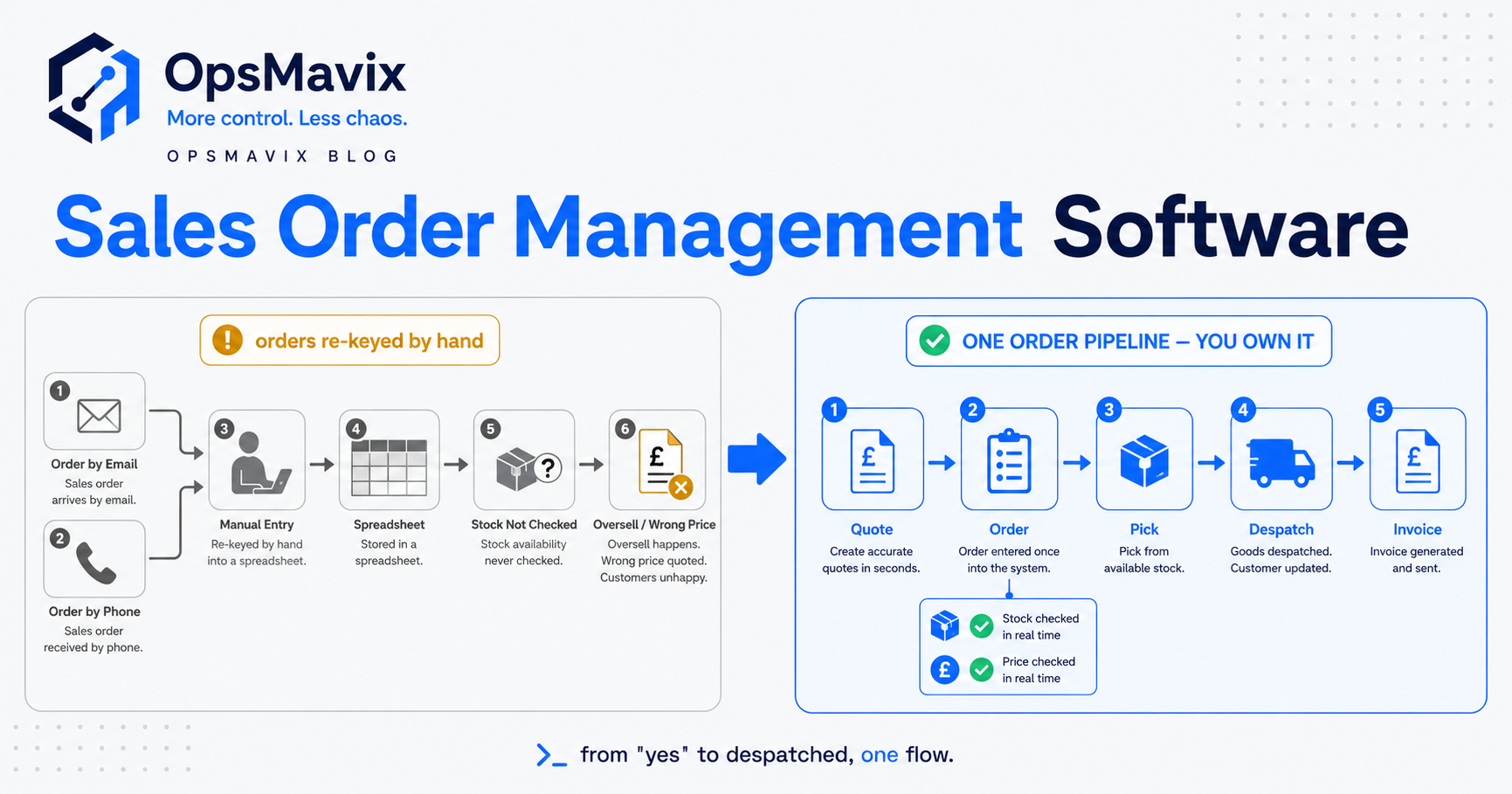
Sales order management software is the system a business uses to capture a customer order and carry it all the way through to a shipped, invoiced and paid transaction — checking stock, reserving it, picking, dispatching, billing and updating every record along the way. In plain terms, it is the machinery that turns a customer saying “yes” into goods out the door and money in the bank, without an order getting lost, duplicated, mispriced or oversold on the journey. Done well, nothing falls through the cracks. Done badly, it becomes another expensive tool your team still works around with a spreadsheet.
Quick summary: Selling is now split across more channels than ever — 28.3% of UK retail sales were made online in December 2025 (ONS), on top of the phone, email and trade-counter orders most businesses still take. Every one of those channels creates a sales order, and when they are managed in separate places the order stage is exactly where stock, pricing and promises drift apart. A full order-management or ERP platform is built to handle that at enterprise scale; most growing businesses only ever use a slice of it, and the real problem to solve is a single, reliable path from order to cash — not owning the biggest system on the market.
Contents
- What sales order management software actually is
- The order-to-cash lifecycle in plain terms
- Why the sales order is where money leaks
- The core capabilities you actually need
- Where generic platforms oversell you
- Sales orders and stock: the overselling link
- Generic platform vs right-sized owned system (table)
- A worked example: one order through the machine
- What “right-sized and owned” actually means
- How to choose without getting oversold
- FAQ
- How OpsMavix Can Help
What sales order management software actually is
A sales order is the internal record a business creates when it agrees to sell goods to a customer: who ordered, what, how many, at what price, to be delivered where and when. Sales order processing is simply “the series of steps through which an item goes to reach its buyer” (Indeed) — order receipt, generating the sales order, picking and packing, dispatch, and invoicing.
Sales order management software is that sequence turned into a working system rather than a chain of manual hand-offs. Instead of an email becoming a spreadsheet row becoming a picking note becoming an invoice — each re-keyed by a different person — the order is entered once and every downstream step reads from the same record. The stock check, the reservation, the pick list, the dispatch note and the invoice all point at one truth.
That is the whole promise: enter it once, and it stays consistent from “yes” to “paid”. Whether you need a heavyweight platform to deliver that, or a lean system shaped around how you actually sell, is the question most vendors quietly skip.
The order-to-cash lifecycle in plain terms
Every sales order, however it arrives, runs through the same underlying stages. Naming them makes it obvious where things break.
- Capture. The order comes in — web checkout, marketplace, EDI, phone, email, trade counter — and becomes a sales order record.
- Validate. Prices, discounts, credit limit and delivery details are checked. Is this customer on the right price list? Are they over their credit limit?
- Allocate. Stock is reserved against the order so nobody else can sell the same units. This is the single most important step, and the one spreadsheets cannot do reliably.
- Fulfil. The order is picked, packed and dispatched, ideally from the location that makes most sense.
- Invoice. The customer is billed for exactly what shipped, at the agreed price.
- Settle. Payment is collected, reconciled and the order is closed.
A good system moves an order through all six without re-keying and without any stage being able to contradict another. Most businesses that “manage orders in a spreadsheet” are really managing capture and invoicing, and doing allocation by memory and hope.
Why the sales order is where money leaks
Ask where a growing business bleeds margin, and it is rarely the sale itself — it is the handling of the order after the sale. The order stage is where several expensive mistakes are born:
- Overselling. Two channels sell the same unit because stock is not reserved the moment an order lands. Someone gets a “sorry, actually out of stock” email a day later.
- Pricing drift. The wrong price list, a stale discount, or a manually typed figure means you ship at a margin you never agreed to.
- Re-keying errors. Every time an order is copied from one system to another, quantities and codes get fat-fingered. A “1” becomes “10”, a SKU becomes its neighbour.
- Lost orders. An email order that nobody turned into a picking note simply never ships — and you find out when the customer chases.
- Slow order-to-cash. Orders that sit in someone’s inbox for two days before being actioned are two days of cash you have not collected.
None of these are dramatic. They are quiet, daily, and they compound. That is exactly why they survive: no single instance is worth a project, so the leak runs for years. Tightening the order process is one of the highest-return fixes in a product business, which is why it sits at the centre of any operations control system worth building.
The core capabilities you actually need
Strip away the vendor feature lists and effective sales order management comes down to a short list of jobs that must be done well:
One order record, entered once. However the order arrives, it becomes a single record that every step reads from. No re-keying between “the order” and “the invoice”.
Live stock allocation. The moment an order is confirmed, stock is reserved. Available-to-sell drops immediately, everywhere you sell, so the same unit cannot be promised twice.
Correct pricing, automatically. The right customer on the right price list with the right discount, without anyone typing a number that can be wrong.
Credit and status control. You can see, at a glance, which orders are on hold, awaiting stock, picking, dispatched or invoiced — and stop an order shipping to a customer who is over their limit.
Fulfilment logic. Deciding which location ships an order and generating a clean pick/pack/dispatch flow, ideally with backorder handling when stock is short.
Clean invoicing and hand-off. The invoice reflects exactly what shipped, and the numbers flow into your accounts without a second round of typing.
Everything else a platform sells you is either supporting detail or capacity you may never touch. If you want the buy-side mirror of this — controlling what you order in rather than what you sell out — that lives in purchase order software, and the two together are what “order control” really means.
Where generic platforms oversell you
Here is the pattern OpsMavix sees again and again. A business outgrows its spreadsheets, starts shopping for “order management software”, and gets steered toward a large generic platform or a full ERP with an order module. On paper it does everything. In practice:
- You configure for months. Generic platforms assume you will bend your process to theirs. Fitting your price lists, your channels and your fulfilment rules into a system built for everyone is slow and expensive.
- You pay for breadth you never use. Manufacturing planning, multi-currency treasury, global tax engines — huge surface area, most of it dark. There are 5.5 million private-sector businesses in the UK and 99.8% of them are SMEs (gov.uk); enterprise-shaped software is not built for the vast majority of them.
- You rent it forever. Per-seat, per-module licensing that rises every year, on software you will never own and cannot fully change.
- The awkward bits stay in a spreadsheet anyway. The one workflow that is specific to how you sell is the one the platform handles worst — so it ends up back in Excel, defeating the point.
The tool is genuinely capable. It is just shaped for a different, much larger business, and the parts you most need are bolted on rather than built in. That mismatch is the actual problem — not a lack of features.
Sales orders and stock: the overselling link
The tightest link in the whole system is between the sales order and your stock position, and it is where generic setups fail most visibly.
The failure looks like this: an order is captured but stock is not reserved until picking, hours or days later. In that gap, another channel sells the same unit. Now two customers own one item, and one of them is about to get bad news. Multiply that across a busy sales day and overselling stops being an accident and becomes a structural feature of how you work.
The fix is not more forecasting — it is allocation at the moment of order. Confirm the order, reserve the stock, drop available-to-sell everywhere in the same instant. We cover the mechanics in how to prevent overselling, and it gets harder — and more important — the moment you hold stock in more than one place, which is where multi-location inventory management comes in. A sales order system that does not reserve stock the instant an order lands is not really managing orders; it is just recording them.
Generic platform vs right-sized owned system
| Generic order/ERP platform | Right-sized owned system | |
|---|---|---|
| Fit to your process | You reshape your workflow to fit the software | The software is shaped to how you actually sell |
| Feature surface | Vast; most modules never used | Only the order-to-cash flow you run |
| Time to live | Months of configuration and consultants | Weeks, focused on your real orders |
| Ownership | Rented; per-seat, per-module, rising yearly | You own the system outright |
| The awkward workflow | Often ends up back in a spreadsheet | Built in, because it is the whole point |
| Changes later | Vendor roadmap and change requests | Changed on your terms when the business changes |
| Cost shape | Ongoing licences that scale with growth | Build cost, then it is yours |
Neither column is “cheap software good, expensive software bad”. A genuinely large, complex operation may need the platform. The point is that most growing businesses are sold the left-hand column when the right-hand column would solve their actual problem for less — and leave them owning the result.
A worked example: one order through the machine
Take a mid-sized wholesaler selling through a trade website, a marketplace and a phone line. Numbers here are illustrative, to show the shape of the problem, not a claim about any real business.
Before. Orders arrive in three inboxes and a checkout. A team member copies each into a master spreadsheet, checks stock by walking to the warehouse or asking, types a price from a PDF price list, and emails a picking note. On a busy Monday, roughly one in twenty orders hits a snag: a unit sold twice, a stale discount applied, an order missed until the customer chases. Each snag costs a phone call, a refund or an apology, and order-to-cash stretches to several days because orders sit before anyone touches them.
After a right-sized system. Every channel writes into one order record. Stock is reserved the moment an order confirms, so available-to-sell drops across all three channels at once — overselling stops being possible rather than being caught later. Prices come from the customer’s assigned price list automatically. A clean pick/pack/dispatch flow runs from the sensible location, and the invoice matches exactly what shipped. The double-sells disappear, the pricing mistakes disappear, and orders move to dispatch the same day instead of sitting in an inbox.
The gain is not a flashy feature. It is the removal of a class of daily errors, plus days shaved off order-to-cash. That is the kind of outcome a right-sized system is built to deliver — and the kind of breadth a generic platform makes you pay for without ever quite fitting.
What “right-sized and owned” actually means
“Right-sized” means the system covers the order-to-cash path you genuinely run and nothing you do not. If you never sell in twelve currencies or plan a factory floor, you should not be configuring, paying for or working around modules that do.
“Owned” means it is yours. Not rented per seat, not gated behind a vendor’s roadmap, not something you lose access to if you stop paying a monthly fee. When your business changes — a new channel, a new pricing rule, a new warehouse — the system changes with you on your terms, not when a vendor prioritises it.
This is the OpsMavix position in one line: growing UK product businesses are too messy for spreadsheets but not ready for a full ERP, and the honest answer for most of them is one right-sized system they own — not a bloated generic platform they rent. Sales order management is one of the clearest places that trade-off shows up, because the order stage is small enough to get right quickly and expensive enough to be worth getting right.
How to choose without getting oversold
A few questions cut through most sales pitches:
- “Show me my order, from capture to invoice, in a five-minute demo.” If it takes a consultant and a month to make your real order flow work, the fit is wrong.
- “When does stock get reserved?” If the answer is anything later than “the moment the order confirms”, overselling is baked in.
- “What here will I never use?” Honest breadth is fine; paying for and maintaining dark modules is not.
- “Do I own this, or rent it forever?” Understand the cost shape over five years, not just year one.
- “What happens when I add a channel or a warehouse next year?” The answer should not be a change-request queue.
If the honest answers point to a heavy platform you will half-use, the real fix is usually smaller and closer to home: a system built around your order flow, that you own, that reserves stock the instant an order lands.
FAQ
What is the difference between order management and sales order management software?
Order management is the broad term for handling customer orders end to end. “Sales order management” emphasises the sell-side sequence specifically — capturing the order, validating price and credit, reserving stock, fulfilling and invoicing. In practice most tools blur the line; what matters is whether the system reserves stock at the moment of order and carries one record all the way to cash.
Do I need sales order management software, or will my accounting or ecommerce tool do?
Accounting tools are strong at invoicing and settlement but weak at allocation — reserving stock so you cannot oversell. Ecommerce platforms handle their own channel well but rarely see your phone, marketplace or trade orders. The gap that hurts is a single stock truth across every channel at the moment of order. If your orders live in more than one place, that gap is where you are leaking.
Is a full ERP overkill for managing sales orders?
Often, yes. An ERP with an order module can do the job, but you configure and pay for a great deal you will never use. For many growing businesses a right-sized system focused on order-to-cash solves the actual problem faster and leaves them owning the result. A large, genuinely complex operation may justify the ERP — the point is to choose deliberately, not by default.
How does sales order management stop overselling?
By reserving stock the instant an order is confirmed, so available-to-sell drops everywhere at once and the same unit cannot be promised to two customers. Systems that only reserve stock at picking leave a gap where overselling happens. This matters most when you hold stock in multiple locations or sell across several channels.
Can a right-sized system connect to the tools I already use?
Yes — a well-built right-sized system is designed to fit your existing stack, feeding invoices into your accounts and reading orders from your channels, rather than forcing a rip-and-replace. That is one of the advantages of owning the system: it is shaped around your tools, not the other way round.
How OpsMavix Can Help
OpsMavix builds right-sized, owned operations systems for growing UK product businesses — manufacturing, inventory and warehouse, wholesale and distribution, and ecommerce that holds stock. Instead of selling you a bloated generic platform and a licence you rent forever, we map your real order-to-cash flow, find where stock, pricing and promises drift apart, and build one system you own that closes those gaps. Sales order management is often the fastest, highest-return place to start. If you want to see where your orders actually leak before spending anything on software, Book a Free Operations Leak Audit.