
Purchase Order Inventory Management System: Right-Sized, Not Bloated
A purchase order inventory management system connects what you order to what you hold — so a reorder point raises the PO, receiving books it against the order, and the cost lands where it belongs. This guide shows why most growing businesses get sold a bloated generic platform when they need one right-sized owned system, and how to tell the two apart before you sign.
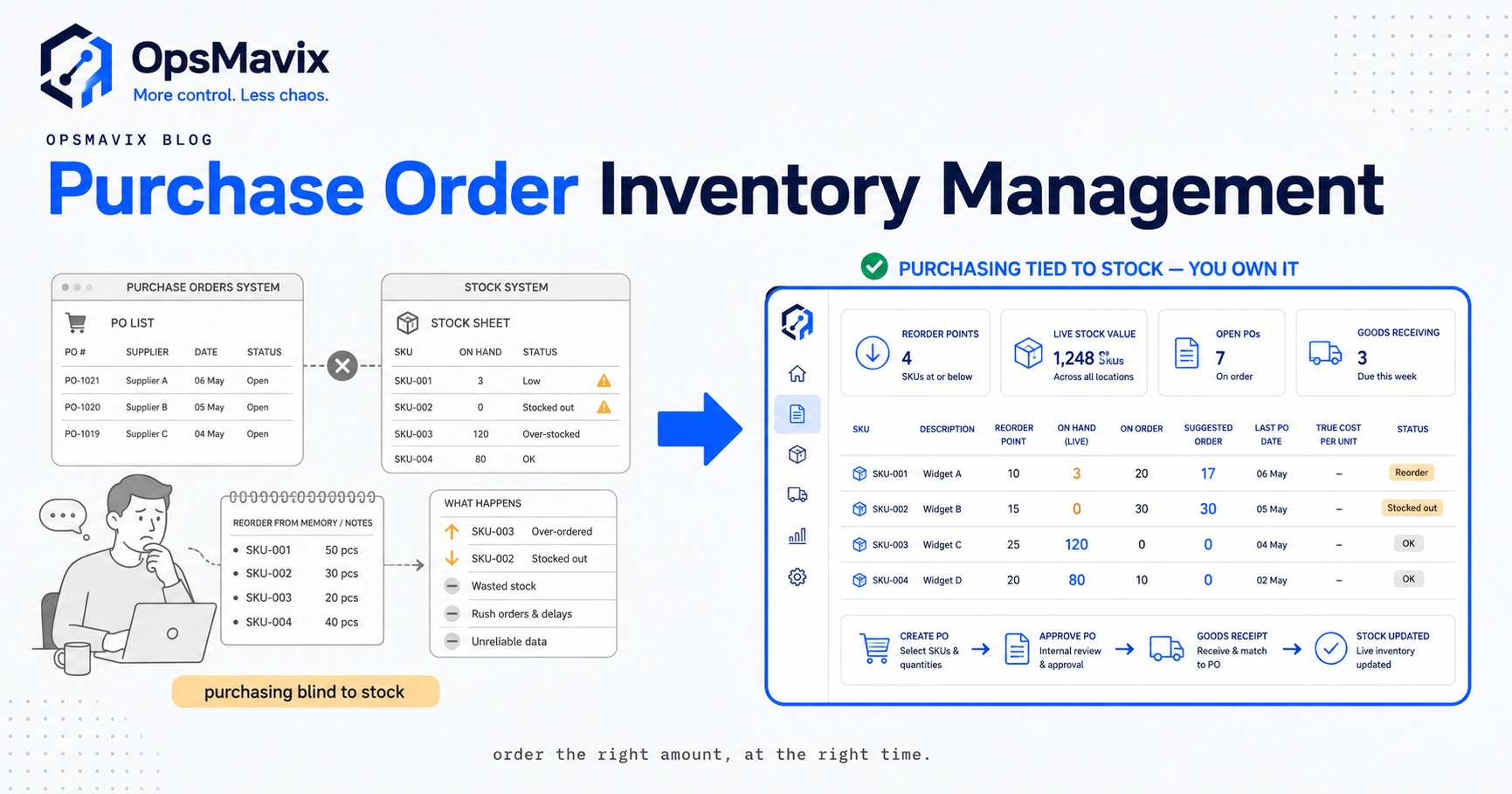
A purchase order inventory management system is the software layer that ties what you buy to what you hold — so the moment stock crosses a reorder point it raises a purchase order, the moment goods arrive receiving books them against that order, and the cost of the buy lands on the item it belongs to. Put plainly, it joins purchasing and inventory into one record instead of leaving them stranded in a spreadsheet, an inbox, and a paper receiving pad that never quite agree.
Quick summary: UK businesses are owed an estimated £26 billion in late payments at any given time, with over 1.5 million businesses — 28% of all firms — affected each year, according to the Small Business Commissioner. Late payment is the visible symptom; the hidden cause is often the same disconnected purchasing-and-stock process this guide is about — where nobody can match an order to a delivery to an invoice cleanly, so bills stall, disputes drag, and cash sits trapped in stock nobody can see.
Most guides on this topic are really disguised sales pitches for a specific platform. This one isn’t. The uncomfortable truth is that the majority of growing product businesses get sold a large, generic system to solve a small, specific problem — and end up paying for ninety modules to use nine. This guide explains what a purchase order inventory management system actually has to do, why the generic-ERP answer is usually the wrong size, and how to spot a right-sized owned system that does exactly the job without the bloat.
Contents
- What a purchase order inventory management system actually does
- The four joins that matter
- Why the generic ERP module is the wrong size
- Generic ERP module vs a right-sized owned system
- A worked example: the reorder that never happened
- Reorder, receiving, cost: the three loops to get right
- What “owned” buys you that “rented” doesn’t
- How to tell if you need one
- FAQ
- How OpsMavix Can Help
- Sources
What a purchase order inventory management system actually does
Strip away the marketing and the job is narrow and specific. A purchase order inventory management system exists to keep three facts in permanent agreement: what you ordered, what you’re holding, and what it cost. Every feature worth paying for serves one of those three, and everything else is a module you were upsold.
The reason this is hard without a system is that those three facts naturally live in three different places — the order with whoever does purchasing, the stock level in the warehouse, the cost in accounting weeks later on a supplier invoice. Each is maintained by a different person with a different tool, and the three only meet when something has already gone wrong: you double-order because you couldn’t see the open PO, you oversell because the stock figure was a guess, or you underprice because the true landed cost never made it back to the product.
A real system collapses the three into one record. The purchase order isn’t a document you file — it’s a live object the stock level and the cost both hang off. Raise a PO for 500 units and inventory immediately knows 500 are on order; receive 480 and the stock goes up by 480, the PO shows 20 short, and the cost of those 480 attaches to the item. Nothing is re-keyed, because nothing was ever separate. That single-record design is the whole point, and it’s the thing a stack of disconnected tools can never give you no matter how many of them you buy.
The four joins that matter
If the system is about keeping order, stock and cost in agreement, then the value is entirely in the joins — the handoffs where one fact updates another. There are four, and a system either enforces them or it doesn’t:
- Stock → order (the reorder join). When an item drops to its reorder point, the system should propose or raise the PO automatically, factoring in what’s already on order so you don’t buy twice. Without this join, reordering runs on someone noticing — which fails on a busy week.
- Order → stock (the on-order join). The moment a PO is live, inventory should treat those units as incoming, so available-to-promise reflects reality. Without it, you either oversell what’s not arrived or panic-buy what is.
- Delivery → stock (the receiving join). When goods arrive, receiving books them in against the specific PO, updating stock and flagging any short or over delivery on the spot. Without it, stock drifts from truth the day it lands.
- Delivery → cost (the landed-cost join). The price paid — ideally including freight and duty — attaches to the units received, so margin is calculated on what the stock actually cost you. Without it, you’re pricing on a guess.
Notice that none of these is exotic — no AI, no predictive analytics, just four plumbing connections done reliably. That’s the tell: the core value of a purchase order inventory management system is unglamorous plumbing, and so many businesses overpay because they were sold a cathedral when they needed working pipes. A focused purchase order software build gets these four joins right and stops; a generic platform buries them under two hundred features you’ll never open.
Why the generic ERP module is the wrong size
Here’s the mechanism nobody selling you an ERP will explain. Generic enterprise platforms are built to fit everyone — a 12-person distributor and a 12,000-person multinational. To fit everyone, they include everything, then make it all configurable. That’s why the demo looks incredible and the implementation takes months: you’re not buying software, you’re buying a construction kit and the labour to assemble it into something that vaguely resembles how you actually work.
For a growing UK product business, that generic-fit design creates four specific costs:
- You pay for surface you don’t use. Manufacturing resource planning, multi-currency consolidation, HR, project accounting — priced in whether you touch them or not. The reorder-and-receiving job you actually needed is a fraction of the licence.
- You bend your process to fit the tool. Because the platform can’t be changed cheaply, you change instead — the way it thinks a receiving flow should work becomes the way yours has to work.
- You can’t get small changes made. The one field you need on the PO screen sits behind a change request, a partner consultant, and an invoice. Configurable in theory, frozen in practice.
- You never own it. Stop paying and it stops working. Your process — the actual competitive thing — lives on someone else’s rails.
None of this means big platforms are bad. For a genuinely large, genuinely complex operation, that surface area earns its keep. The error is size mismatch: buying the platform built for a 12,000-person firm because you couldn’t find anything shaped like your 30-person one. The canonical position, worth internalising, is that plenty of businesses are too messy for spreadsheets but not ready for a full ERP — and the market sells them the ERP anyway, because that’s what the market has to sell. The operations control system approach exists precisely for that gap.
Generic ERP module vs a right-sized owned system
The two aren’t different amounts of the same thing — they’re different shapes. One is a broad platform you rent and configure; the other is a narrow system you own and it fits from day one. Here’s how they compare on the things that actually decide the outcome.
| Dimension | Generic ERP / PO module | Right-sized owned system |
|---|---|---|
| Scope | Everything, for everyone; you use a fraction | Exactly your reorder → receiving → cost flow, nothing spare |
| Fit | You bend your process to the tool | The tool is built to your process |
| Time to live | Months of configuration and consulting | Weeks; it does one job well from the start |
| Cost shape | Per-seat licence forever, plus implementation | One build cost; you own the result |
| Changes | Change request → consultant → invoice → wait | A direct change to a system you control |
| Ownership | Rented; stops working when you stop paying | Owned outright; runs on your own infrastructure |
| Data | In their format, on their servers | In your database, exportable, yours |
| Upgrade pressure | Forced migrations, deprecated features, price rises | You upgrade when it serves you, not the vendor |
| What you’re really buying | Access to a platform | A capability you keep |
The row that matters most is the last one. With the generic route you’re buying access — an ongoing right to use software that remains fundamentally theirs. With the owned route you’re buying a capability — a working system that remains yours whatever happens to any vendor. For a business whose purchasing-and-stock process is genuinely core to how it makes money, renting the thing that runs your core is a strange trade to make by default.
A worked example: the reorder that never happened
Abstractions don’t persuade; let’s make it concrete. Take a mid-sized wholesaler — real shape, invented numbers, no figures presented as fact.
They stock roughly 1,200 SKUs across one warehouse. Purchasing is a shared spreadsheet. Stock is a second spreadsheet, updated when someone remembers. Supplier invoices go to accounts, who key them into the books a fortnight later. Three tools, three people, no joins.
A fast-moving line runs low. It should reorder at 200 units. It hits 200 on a Monday, but the reorder point lives in a spreadsheet nobody opened that week, so nothing fires. By Thursday it’s at 40. A big customer orders 150. The sales screen shows “in stock” because it reads the stale figure. The order is confirmed, the customer is promised, and the units aren’t there.
Now the scramble. Purchasing raises a rush PO, pays a premium for expedited freight, and part-ships the customer to save the relationship. The warehouse receives the rush delivery but books it against the wrong spreadsheet line, so stock is now wrong in a new way. Two weeks later the supplier invoice arrives with the freight premium baked in — but accounts keys it as standard cost, because the extra was never linked to the order. The margin on that line is now quietly overstated in every report, forever.
Count the leaks from one missed reorder join: a near-oversell that damaged a customer relationship, an avoidable freight premium, a receiving error that corrupted stock accuracy, and a costing error that will misprice the product until someone notices. Not one appears as an error in any system. They surface only as a margin mysteriously thinner than the spreadsheet says it should be.
With the four joins in place, none of it happens. Stock hits 200, the system raises the PO that day. The 150-unit customer order sees the true available figure and the incoming PO, so it’s promised against real supply. Receiving books the delivery against the PO — quantities reconciled at the door. The supplier invoice matches the PO and the receipt, freight and all, so the true landed cost attaches to the line and margin stays honest. The difference between the two stories isn’t effort or diligence. It’s whether the joins exist.
Reorder, receiving, cost: the three loops to get right
Everything above reduces to three loops. Get these right and you have a working system; get any one wrong and the other two inherit the error.
The reorder loop
The reorder loop decides when and how much to buy, and it only works if it can see current stock, open purchase orders, and demand at once. The most common failure is ignoring what’s already on order — reordering against a low stock figure without noticing an inbound PO for the same item, so you double-buy and tie up cash. A right-sized system nets stock-on-hand plus stock-on-order against the reorder point, then decides. It doesn’t need machine learning; it needs to not be a spreadsheet that forgets the open POs. For businesses holding stock in more than one place, this is where a multi-location inventory management design earns its keep — a reorder that can’t see all locations will restock one site while another drowns in the same SKU.
The receiving loop
The receiving loop is where intention meets reality, and it protects everything downstream. The rule is simple and rarely followed: book goods in against the specific PO, at the door, before signing. Count what arrived, match it to what was ordered, log any short or damaged units then and there. Do this and stock accuracy holds and the invoice match has something true to check against. Skip it — book “roughly what the note says” days later — and stock drifts, and the three-way match collapses into rubber-stamping the paperwork. This loop also decides whether you can trust your available-to-sell figure, which is the whole battle in how to prevent overselling: you cannot promise stock honestly if receiving isn’t honest first.
The cost loop
The cost loop is the one businesses most often skip entirely, and the one that silently distorts every pricing and margin decision. The unit cost that matters is the landed cost — purchase price plus freight, duty, and handling to get it into your warehouse. If your system records only the invoice line price, or a standing “list cost” that never updates, every margin figure you look at is fiction. The loop closes when the true amount paid on a specific PO attaches to the specific units received, so the number you price against is the number it actually cost. Unglamorous, and where real money hides.
What “owned” buys you that “rented” doesn’t
“Owned” isn’t a slogan; it’s a set of concrete properties the rented route can’t offer, and they compound over years.
- The process stays yours. Your purchasing-and-stock flow is a competitive asset — it’s how you run leaner than the next distributor. Owning the system means that asset lives on your infrastructure, in your database, changeable by you. Renting means your core capability is a feature of someone else’s roadmap.
- Changes are cheap and fast. When the field you need is a direct change to a system you control rather than a request in a vendor’s queue, the system keeps fitting as you grow. Rented systems fit worse over time, because your process moves and theirs doesn’t.
- No forced migrations or surprise price rises. You upgrade when it serves you — not when a feature you depended on is deprecated or a licence renewal doubles because the vendor repositioned upmarket.
- The bill stops. A build has a cost, then it’s a capability you keep. Per-seat licences never stop, and scale with headcount whether or not the extra seats use the extra features.
The honest caveat: owned systems need a builder, and you want one who builds narrow and reliable rather than broad and fragile. The goal is not to rebuild an ERP from scratch — that’s the same over-build error in a different costume. The goal is a system scoped to your reorder, receiving and cost loops, built well, and handed to you to keep. That restraint is the whole discipline.
How to tell if you need one
You don’t need a system because a salesperson said so. You need one when the disconnected version is costing real money, and the signs are clear: you’ve double-ordered because nobody could see the open PO; you’ve oversold stock that wasn’t there; your reported margin doesn’t match your bank balance and landed cost is the suspect; reordering depends on one person remembering; your stock figure is a number you distrust, so you count physically before promising anything; receiving errors are found weeks later, if ever.
If two or three of those are familiar, the process is already leaking — you’re just paying the cost in margin rather than in a licence. The question isn’t whether to fix it; it’s whether to fix it with a bloated platform sized for someone ten times larger, or with a right-sized owned system shaped exactly to the reorder-receiving-cost job. For most growing UK product businesses, the second is cheaper, faster to live, and yours to keep.
FAQ
What is a purchase order inventory management system?
It’s software that connects purchasing to stock control, so that ordering, receiving and stock levels stay in agreement automatically. When an item hits its reorder point it raises or proposes a purchase order; when the PO is live, inventory counts those units as on order; when goods arrive, receiving books them against that PO and updates stock; and the cost paid attaches to the units received. The core job is keeping three facts — what you ordered, what you hold, and what it cost — in permanent sync on one record instead of across separate tools.
Do I need a full ERP for purchase order and inventory management?
Usually not. A full ERP is built to fit every kind of business, which means it includes far more than a purchasing-and-stock job needs and costs accordingly — in licence, in months of configuration, and in bending your process to fit the tool. Many growing businesses are too messy for spreadsheets but not big enough to justify an ERP, and for them a right-sized system scoped to reorder, receiving and cost does the whole job at a fraction of the size. Below genuinely large, complex scale, the ERP is usually a size mismatch you pay for forever.
What’s the difference between a rented platform and an owned system?
A rented platform is software you pay to access — it remains the vendor’s, runs on their servers, changes on their roadmap, and stops working when you stop paying. An owned system is one built for you that lives on your infrastructure, in your database, changeable by you, and yours to keep whatever happens to any vendor. Owned systems have an upfront build cost; rented ones have a licence that never stops and scales with headcount.
What is landed cost and why does it matter here?
Landed cost is the true cost of getting a unit into your warehouse — the purchase price plus freight, duty and handling — rather than just the invoice line price. It matters because every margin and pricing decision is only as accurate as the cost figure behind it. If your system records a standing list cost that never updates, or only the base price, your reported margins are fiction. A proper system attaches the real amount paid on a purchase order to the units received, so you price against what stock actually cost you.
How long does a right-sized system take to build?
Far less than a generic-platform implementation, because there’s nothing to configure into shape — it’s built to your flow from the start. A generic ERP typically takes months of consulting to fit; a system scoped to your reorder, receiving and cost loops is a matter of weeks. The exact timeline depends on how many locations, suppliers and SKUs are in play and how your current data is held, which is what a scoping audit establishes before anything is built.
How OpsMavix Can Help
OpsMavix builds right-sized, owned operations systems for growing UK product businesses — manufacturing, inventory and warehousing, wholesale and distribution, and ecommerce with real stock. We’re not an ERP vendor and we won’t sell you a platform built for a company ten times your size; we build the specific system that ties your purchasing to your stock — reorder, receiving, landed cost — so the joins that leak money today become impossible to skip, and hand it to you to own outright. If you’re too messy for spreadsheets but not ready for a full ERP, that’s exactly the gap we build for. Start by seeing where your current process actually leaks: Book a Free Operations Leak Audit.