
Production Planning Software: What It Does and What You Actually Need
Production planning software turns demand, capacity, and materials into a realistic schedule of what to make and when. This guide explains what it actually does, why so many UK manufacturers get sold a bloated generic platform they never fully use, and how to right-size a system you own instead.
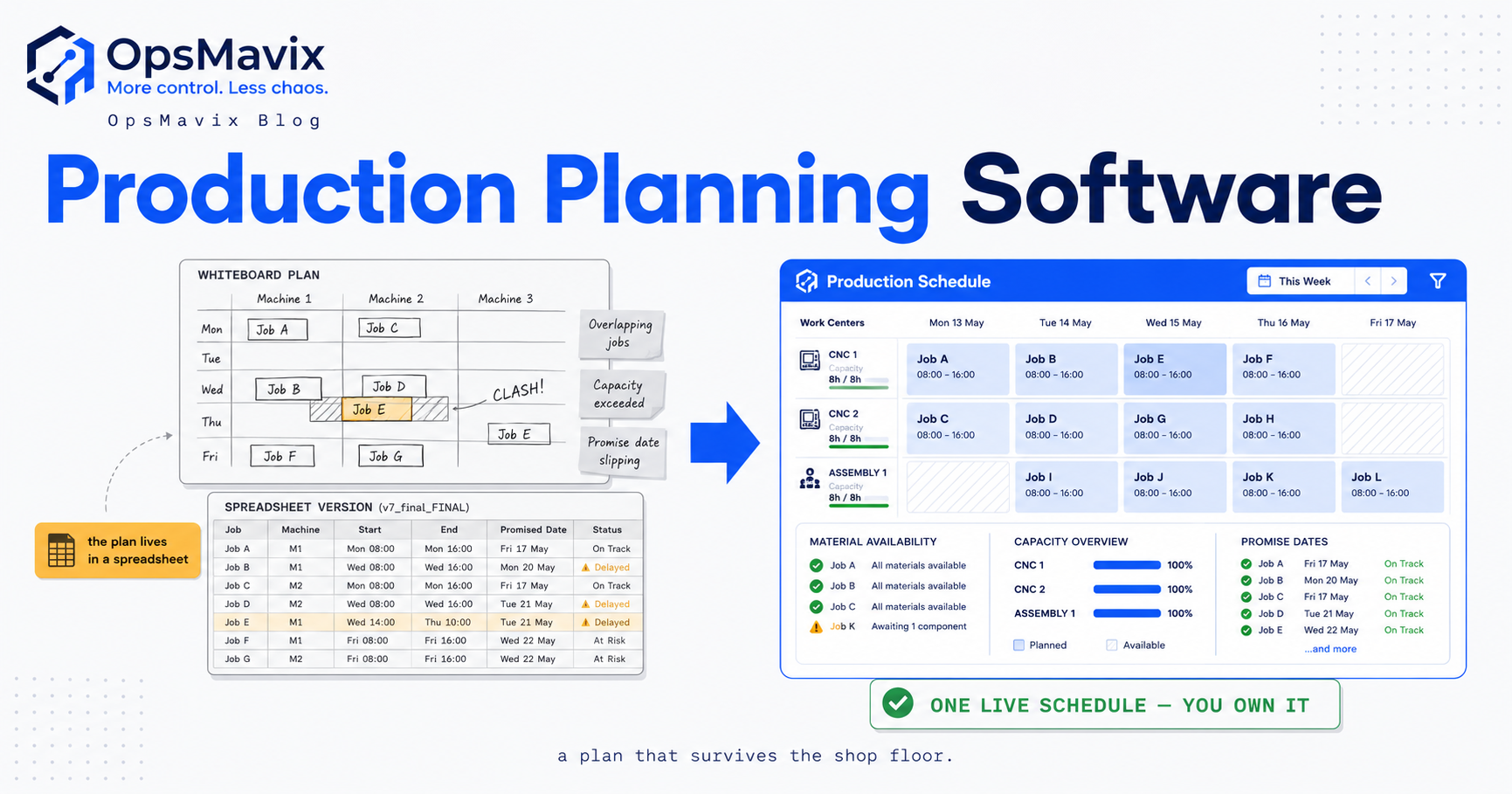
Production planning software is the system a manufacturer uses to decide what to make, in what order, on which machines or lines, and by when — turning customer demand, available capacity, and material availability into a realistic, sequenced schedule instead of a wishlist. Where a spreadsheet holds a list of orders, production planning software works out whether those orders can actually be built in the time promised, flags where they collide, and tells the floor what to run next.
Quick summary: UK manufacturing contributed £217bn in output to the economy in 2024 and supported 2.6 million jobs, according to Make UK’s UK Manufacturing: The Facts 2024. A sector that large runs on scheduling decisions made every day — yet a huge share of smaller UK manufacturers still plan production in spreadsheets and heads, which is exactly where promised dates slip and machines sit idle.
Contents
- What production planning software actually does
- Planning vs scheduling vs MRP
- The core functions worth paying for
- Signs you have outgrown spreadsheets
- The trap: buying a platform far bigger than your problem
- Generic platform vs right-sized owned system
- A worked example
- How to choose without over-buying
- FAQ
- How OpsMavix Can Help
- Sources
What production planning software actually does
Strip away the vendor language and production planning software does one job: it reconciles three things that are always in tension — demand (what customers have ordered or are forecast to order), capacity (how much your machines, lines, and people can actually produce in a given period), and materials (whether you have, or can get, the components to build it). A plan is the answer to a question those three things pose together: can we make what we’ve promised, with what we’ve got, in the time we’ve said?
That reconciliation is deceptively hard to do by hand. Any one order looks feasible in isolation. The trouble is that orders share resources: two jobs both need the same CNC cell on Thursday, a rush order jumps the queue and pushes three others past their promised dates, a material shortage on one line strands capacity that another job could have used. A spreadsheet lists the orders faithfully but cannot see the collisions, because it has no model of your capacity or your material flow. Production planning software exists to hold all three variables at once and show you where they break.
The output most people picture is a schedule — a sequenced, dated list of what runs where. But the more valuable output is the honest promise date. When a customer asks “can you have 500 units by the 20th?”, good planning software answers from your real committed load, not from optimism. That single capability — quoting dates you can actually hit — is worth more than most of the features vendors lead with.
Planning vs scheduling vs MRP
These three terms get used interchangeably in sales conversations, and the blur is expensive because it leads businesses to buy the wrong layer. They are different jobs.
Planning is the medium-term question: over the coming weeks or months, does our total demand fit our total capacity, and where are the pinch points? It works at the level of “we have 40 hours of assembly capacity a week and 55 hours of committed work in three weeks’ time” — a warning, not yet a minute-by-minute plan.
Scheduling is the short-term, granular question: given everything we’ve committed to, in what exact order do we run jobs on each machine this week, accounting for changeovers, shift patterns, and dependencies? This is where manufacturing scheduling software lives — turning the plan into a runnable sequence on the floor.
MRP (material requirements planning) works the other way round, from the bill of materials: given what we plan to build, what components do we need, how many, and when must we order them so they arrive in time? A proper MRP system explodes each finished product into its parts and nets that against stock and existing purchase orders. Planning tells you whether you can build; MRP tells you what to buy so you can.
Most growing manufacturers need a blend, weighted toward planning and light scheduling, with just enough material logic to avoid stockouts. Very few need the full, heavyweight MRP-II engine that generic platforms are built around — and buying that engine to solve a scheduling problem is how businesses end up paying for, and fighting with, ninety per cent of a system they never switch on.
The core functions worth paying for
Whatever the label on the box, a handful of functions carry almost all the value for a growing product business. Everything else is usually weight.
Capacity-aware scheduling
The system must know your real capacity — machines, cells, shifts, people — and refuse to promise more than exists. A schedule that lets you commit 55 hours of work into a 40-hour week is just a prettier spreadsheet. Capacity awareness is the single feature that separates planning software from a to-do list.
A live view of commitments
Every open works order, its stage, and its promised date, in one place, updating as the floor reports progress. The value is answering “where is job 4471 and will it ship on time?” in seconds rather than by walking the floor. This is the backbone of manufacturing production tracking — the plan and reality kept on the same record.
Material readiness
Before a job is scheduled to start, can it actually run — are the components in stock or on a confirmed order? Tying the plan to material availability stops the most demoralising waste on any floor: setting up for a job that can’t finish because a part never came. This is where planning meets purchase order software — the plan should trigger the buying, not discover the shortage.
Realistic promise dates
Quoting from live committed load rather than gut feel. This protects your reputation on the sales side and your margin on the delivery side, because the dates you win work on are dates you can actually keep.
Fast re-planning
Reality breaks plans daily — a machine goes down, a rush order lands, a delivery slips. The system’s job is to let you re-sequence in minutes and see the knock-on effects, not to hold a beautiful plan that was true only on Monday morning.
Notice what is not on that list: shop-floor IoT telemetry, finite-scheduling optimisation with genetic algorithms, multi-plant global supply balancing, demand-sensing AI. These exist, they are real, and for the overwhelming majority of UK SME manufacturers they are cost and complexity with no return.
Signs you have outgrown spreadsheets
Spreadsheets are not a joke tool — many capable manufacturers plan on them for years. The question is not whether a spreadsheet can plan, but whether yours has quietly stopped coping. The tells are consistent:
- Promised dates are guesses. Sales quotes lead times from experience, not from current load, so some quotes are dangerously tight and others needlessly slow.
- The plan and reality have diverged. The spreadsheet says one thing; the floor is doing another; nobody fully trusts either.
- One person owns the plan in their head. When they’re on holiday, planning stops. The knowledge isn’t in the system — it’s in them.
- You find shortages at the machine. Jobs get set up, then stall because a component isn’t there, because the plan and the buying were never connected.
- Re-planning takes hours. A single disruption means an afternoon of manual reshuffling, so people avoid it and the plan drifts further from reality.
- You can’t answer “what’s our real capacity next month?” without a lot of manual adding-up that’s stale the moment it’s done.
Any two of these together mean the spreadsheet has become a record of intentions rather than a tool for control. That is the point at which software earns its keep — but it’s also the point where the buying goes wrong.
The trap: buying a platform far bigger than your problem
Here is the pattern OpsMavix sees repeatedly. A growing manufacturer hits the wall above, starts looking at software, and gets funnelled straight into a full manufacturing ERP or a generic MRP/SCM planning platform. The demo is impressive. It does everything — finite scheduling, multi-currency, quality modules, plant maintenance, demand forecasting, the lot. The business signs up, because who wants to buy a system they’ll outgrow?
Then reality arrives. The platform is built for a manufacturer five times their size and shaped nothing like their process. Implementation drags for months. Configuration needs a consultant who charges by the day. Half the modules are switched off because nobody has time to set them up. Staff quietly keep using the old spreadsheet alongside the new system because the new one is slower for the ten things they actually do. The licence renews annually whether the value showed up or not, and the manufacturer is now renting complexity to solve a problem that needed a scalpel.
The core issue is ownership and fit. A generic platform is built to sell to everyone, so it fits no one exactly; you bend your process to its assumptions, or you pay to bend it to yours, and either way you never own it — you rent access on the vendor’s terms. The features you’re paying for are mostly there to justify the price to businesses that aren’t you.
A right-sized owned system inverts every one of those trade-offs. It does the handful of functions that carry the value — capacity-aware scheduling, live commitments, material readiness, honest dates, fast re-planning — shaped to how your floor actually runs, with nothing bolted on that you’ll never use. Because it’s built to fit, adoption isn’t a fight. Because you own it, there’s no renewal treadmill and no vendor deciding your roadmap. It’s the difference between the outcome — a plan the floor trusts and dates you can keep — and a licence for software that promises the outcome and delivers a project.
Generic platform vs right-sized owned system
| Generic MRP / ERP planning platform | Right-sized owned system | |
|---|---|---|
| Built for | Every manufacturer, so no one exactly | Your process, your floor, your product mix |
| Scope | Hundreds of features; you use a fraction | The functions that carry the value, nothing else |
| Fit | You bend your process to its model | The system is shaped to how you already work |
| Implementation | Months; often needs a paid consultant | Weeks; built around your real workflow |
| Adoption | Staff resist; shadow spreadsheets survive | Faster for the daily tasks, so it gets used |
| Cost shape | Recurring per-seat licence, indefinitely | Built once, owned; no rented-complexity treadmill |
| Ownership | You rent access on the vendor’s terms | You own the system and the roadmap |
| When it changes | Change request, queue, sometimes a fee | It’s yours to evolve as the business does |
The table isn’t an argument that big platforms are bad — for a large, complex, multi-site manufacturer they can be exactly right. It’s an argument that fit beats feature count for a growing SME, and that most of the pain manufacturers report with planning software comes from buying for a scale and complexity they don’t have.
A worked example
Consider a fictional UK maker of stainless steel catering equipment — call them a 30-person fabrication shop running laser cutting, forming, welding, and assembly, quoting bespoke and semi-standard jobs.
On spreadsheets. Sales quotes a four-week lead time on a £42,000 order because that’s “roughly normal”. What the spreadsheet can’t show is that the welding bay is already at 90% committed for those four weeks. The job is accepted, scheduled to start in week three, and stalls: welding is jammed, and by the time it clears, a bracket component ordered late — because nobody netted the job against stock until it was due to start — hasn’t arrived. The order ships nine days late. The customer is annoyed, and the team spent hours firefighting a collision the spreadsheet couldn’t have warned them about.
On a right-sized owned system. When sales enters the same enquiry, the system checks live welding-bay capacity for the requested window and shows it’s already tight — so it proposes a five-week date that’s actually achievable, or flags that overtime in week two would make four weeks safe. At the same moment, the job’s bill of materials is netted against stock and open purchase orders, so the bracket shortage surfaces on day one and a PO goes out immediately, not on the day the job was meant to start. The promised date is honest, the material is confirmed before setup, and the job ships on time. Nothing about the machines changed — only that the plan could finally see the collision and the shortage before they became a late delivery.
The gain here isn’t exotic. It’s just the three variables — demand, capacity, materials — held together instead of scattered across a spreadsheet, a purchasing inbox, and one planner’s memory.
How to choose without over-buying
If you’re evaluating production planning software, the discipline that saves the most money is refusing to be sold on feature count. A few rules:
Start from your real problem, not the demo. Write down the three or four planning failures that actually cost you money — missed dates, idle machines, shortages at the bench. Any system you consider must fix those. Everything else is negotiable.
Count the features you’ll switch off. In a generic platform demo, tally how many modules you’d never configure. If it’s most of them, you’re pricing complexity you’ll pay to ignore. That’s the moment to ask whether a right-sized build fits better.
Test adoption, not capability. The question isn’t “can it do X?” — most platforms can. It’s “will my planner reach for this on a Tuesday, or quietly keep the spreadsheet?” A system that’s slower for the daily job doesn’t get used, however powerful it is.
Treat integration as first-class. Planning that can’t see purchasing, stock, and the floor is planning in a vacuum. The value comes from connecting demand, capacity, and materials — a broader supply chain management software view stitched to your actual data, not a planning island.
Weigh ownership against renewal. A licence you rent forever versus a system you own and evolve is a different financial shape over three to five years. Do that arithmetic before you sign, not after.
The goal is not the most capable system on the market. It’s the smallest system that fully solves your planning problem, shaped to your floor, that your team will actually use — and, ideally, one you own.
FAQ
What is production planning software?
Production planning software is a system that decides what a manufacturer should make, in what order, on which resources, and by when — reconciling customer demand, available capacity, and material availability into a realistic schedule. It differs from a spreadsheet in that it models your capacity and materials, so it can spot when orders collide or when a job can’t start for lack of parts, rather than just listing the orders.
What’s the difference between production planning and scheduling?
Planning is the medium-term question of whether your total demand fits your total capacity over the coming weeks, and where the pinch points are. Scheduling is the short-term, granular sequencing of exactly which job runs on which machine this week, accounting for changeovers and shifts. Planning tells you whether the work fits; scheduling turns that into a runnable order on the floor. Most growing manufacturers need both, weighted toward planning.
Do I need MRP or production planning software?
They answer different questions. Production planning asks whether you can build what you’ve promised with the capacity you have. MRP works from the bill of materials to tell you what components to buy and when so the build can happen. Many growing manufacturers need planning with just enough material logic to avoid stockouts, rather than a full heavyweight MRP engine. Buying a large MRP system to solve a scheduling problem is a common and expensive mismatch.
Can’t I just use a spreadsheet for production planning?
For a while, yes — plenty of capable manufacturers do. The tells that you’ve outgrown it are consistent: promised dates become guesses, the plan and the floor diverge, one person holds the plan in their head, shortages get found at the machine, and re-planning takes hours. When two or more of those are true, the spreadsheet has become a record of intentions rather than a tool for control, and software starts to earn its keep.
Why not just buy a big manufacturing ERP?
For a large, complex, multi-site manufacturer, a full ERP can be exactly right. For a growing SME, it usually means buying a platform built for a business five times your size — months of implementation, paid consultants, most modules switched off, and staff quietly keeping the old spreadsheet. Fit beats feature count at that scale. A right-sized system that does the handful of functions that carry the value, shaped to your floor and owned by you, tends to deliver the outcome with far less cost and friction.
How OpsMavix Can Help
OpsMavix builds right-sized operations systems for growing UK product businesses — manufacturing, inventory, wholesale, and ecommerce-with-stock — that are too messy for spreadsheets but nowhere near needing a full ERP. Instead of selling you a generic platform where you use a tenth of the features and rent the rest forever, we design a system around the planning problem you actually have: capacity-aware scheduling, live commitments, material readiness, honest promise dates, and fast re-planning, shaped to how your floor really runs and owned by you. We sell the outcome — a plan your team trusts and dates you can keep — not a licence and a project. If you want to see where your production planning leaks money today, Book a Free Operations Leak Audit.